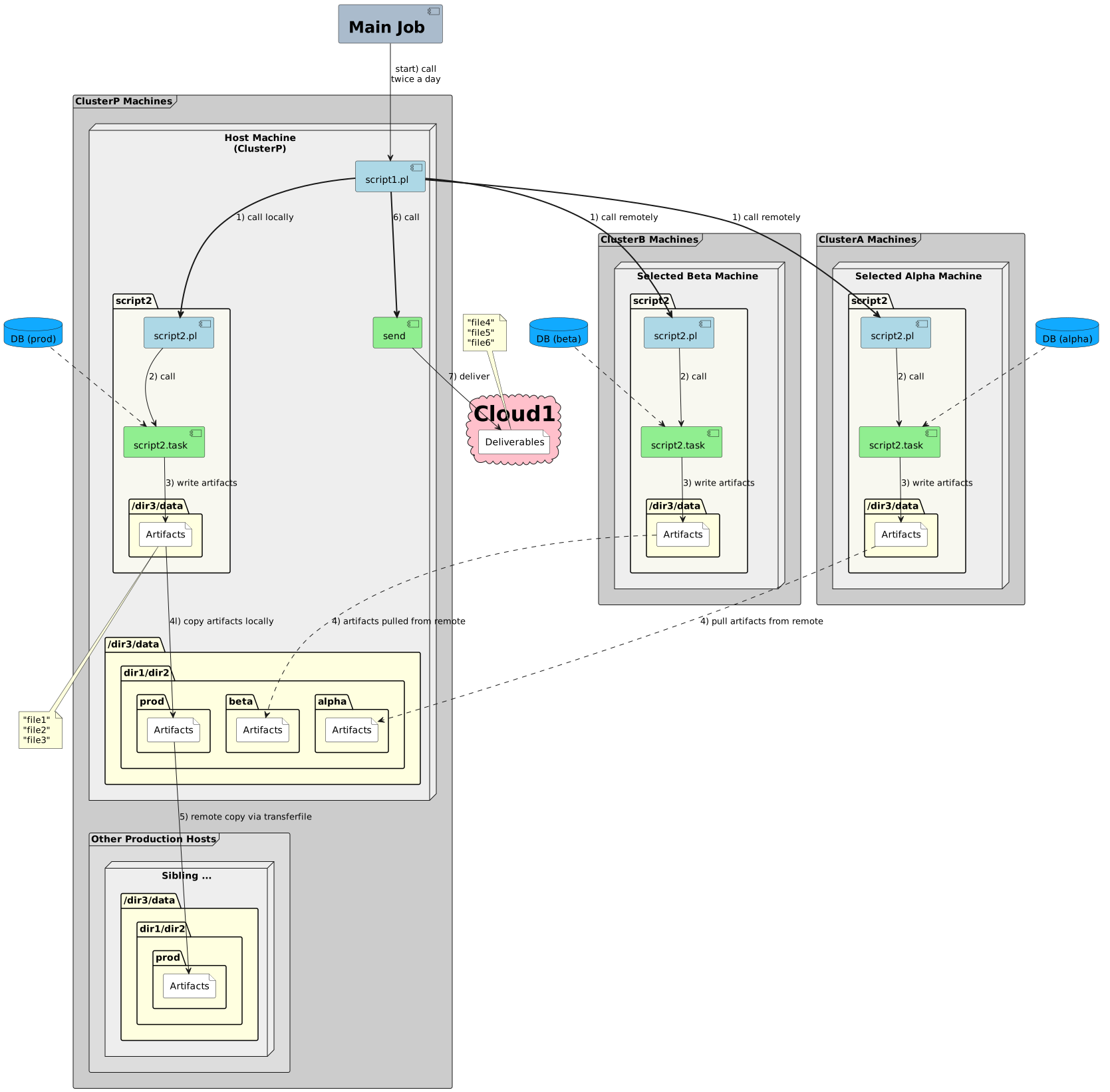
I have a PlantUML diagram that was created in Diagramator by a former coworker. The diagram is far taller than it needs to be, and items in separate columns that could & should be parallelized seem to be spaced serially. How can I make this more compact?
<img src='https://diagramator.mycompany.com/plantuml?@startuml %0Ahide stereotype %0Askinparam frame { %0ABackgroundColor%3C%3Ccluster>> %23CCCCCC %0ABackgroundColor%3C%3Csiblings>> %23DDDDDD %0A} %0Askinparam cloud { %0ABackgroundColor%3C%3Creceiver>> %23Pink %0AFontStyle%3C%3Creceiver>> bold %0AFontSize%3C%3Creceiver>> 32 %0A} %0Askinparam node { %0ABackgroundColor%3C%3Cmachine>> %23EEEEEE %0A} %0Askinparam component { %0ABackgroundColor%3C%3Ctask>> %23LightGreen %0ABackgroundColor%3C%3Cperl>> %23LightBlue %0ABackgroundColor%3C%3Cbash>> %23Yellow %0ABackgroundColor%3C%3Cjobm>> %23aabbcc %0ABackgroundColor%3C%3Csender>> %23LightGreen %0AFontStyle%3C%3Cjobm>> bold %0AFontSize%3C%3Cjobm>> 24 %0A} %0Askinparam defaultTextAlignment%3C%3Cjobm>> center %0Askinparam package { %0ABackgroundColor %23F8F8F0 %0A} %0Askinparam folder { %0ABackgroundColor %23LightYellow %0AFolderFontStyle Bold %0AFolderTextFontStyle Bold %0A} %0Askinparam file { %0ABackgroundColor White %0A} %0Askinparam frame { %0ABackgroundColor %23LightYellow %0AFrameFontStyle Bold %0AFrameTextFontStyle Bold %0A} %0Askinparam database { %0A BackgroundColor %2311aaff %0A} %0Acomponent "Main Job" as JOBM %3C%3Cjobm>> %0Adatabase "DB (prod)" as db_prod %0Aframe "ClusterP Machines" as clusterp %3C%3Ccluster>> { %0A node "Host Machine\n(ClusterP)" as Host %3C%3Cmachine>> { %0A component "script1.pl" as script1_pl %3C%3Cperl>> %0A package script2 { %0A component "script2.pl" as script2_pl %3C%3Cperl>> %0A component "script2.task" as script2_task %3C%3Ctask>> %0A folder "/dir3/data" as prod_source_path { %0A file "Artifacts" as local_source_artifacts %0A } %0A } %0A folder "/dir3/data" { %0A folder "dir1/dir2" as target_root { %0A folder "prod" as local_prod_path { %0A file "Artifacts" as local_prod_artifacts %0A } %0A folder "beta" as local_beta_path { %0A file "Artifacts" as local_beta_artifacts %0A } %0A folder "alpha" as local_alpha_path { %0A file "Artifacts" as local_alpha_artifacts %0A } %0A } %0A } %0A component send as sender %3C%3Csender>> %0A } %0A frame "Other Production Hosts" as Siblings %3C%3Csiblings>> { %0A node "Sibling ..." as Sibling %3C%3Cmachine>> { %0A folder "/dir3/data" as sibling_data { %0A folder "dir1/dir2" as sibling_target_root { %0A folder "prod" as sibling_prod_path { %0A file "Artifacts" as sibling_prod_artifacts %0A } %0A } %0A } %0A } %0A } %0A} %0Adatabase "DB (beta)" as beta_db %0Aframe "ClusterB Machines" as clusterb %3C%3Ccluster>> { %0A node "Selected Beta Machine" as Beta.Host %3C%3Cmachine>> { %0A package "script2" as beta_script2 { %0A component "script2.pl" as beta_script2_pl %3C%3Cperl>> %0A component "script2.task" as beta_script2_task %3C%3Ctask>> %0A folder "/dir3/data" as beta_source_path { %0A file "Artifacts" as remote_beta_artifacts %0A } %0A } %0A } %0A} %0Adatabase "DB (alpha)" as alpha_db %0Aframe "ClusterA Machines" as clustera %3C%3Ccluster>> { %0A node "Selected Alpha Machine" as Alpha.Host %3C%3Cmachine>> { %0A package "script2" as alpha_script2 { %0A component "script2.pl" as alpha_script2_pl %3C%3Cperl>> %0A component "script2.task" as alpha_script2_task %3C%3Ctask>> %0A folder "/dir3/data" as alpha_source_path { %0A file "Artifacts" as remote_alpha_artifacts %0A } %0A } %0A } %0A} %0Acloud "Cloud1" as Cloud1 %3C%3Creceiver>> { %0A file "Deliverables" as receiver %0A} %0Anote as Artifacts %0A "file1" %0A "file2" %0A "file3" %0Aend note %0Anote as Deliverables %0A "file4" %0A "file5" %0A "file6" %0Aend note %0A[JOBM] --> [script1_pl] : start) call\ntwice a day %0A[db_prod] ..> [script2_task] %0A[script1_pl] ==> [script2_pl] : 1) call locally %0A[script1_pl] ==> [beta_script2_pl] : 1) call remotely %0A[script1_pl] ==> [alpha_script2_pl] : 1) call remotely %0A[script2_pl] --> [script2_task] : 2) call %0A[script2_task] --> [local_source_artifacts] : 3) write artifacts %0A[local_source_artifacts] --> [local_prod_artifacts] : 4l) copy artifacts locally %0A[beta_db] ..> [beta_script2_task] %0A[beta_script2_pl] --> [beta_script2_task] : 2) call %0A[beta_script2_task] --> [remote_beta_artifacts] : 3) write artifacts %0A[remote_beta_artifacts] ..> [local_beta_artifacts] : 4) artifacts pulled from remote %0A[alpha_db] ..> [alpha_script2_task] %0A[alpha_script2_pl] --> [alpha_script2_task] : 2) call %0A[alpha_script2_task] --> [remote_alpha_artifacts] : 3) write artifacts %0A[remote_alpha_artifacts] ..> [local_alpha_artifacts] : 4) pull artifacts from remote %0A[local_source_artifacts] --> [Artifacts] %0A[local_prod_artifacts] --> [sibling_prod_artifacts]: 5) remote copy via transferfile %0A[script1_pl] ==> [sender] : 6) call %0A[sender] --> [receiver] : 7) deliver %0A[Deliverables] --> [receiver] %0A@enduml %0A'/>
(--------)
Hello O., and all,
- What is your plantuml version?- What is your GraphViz version?
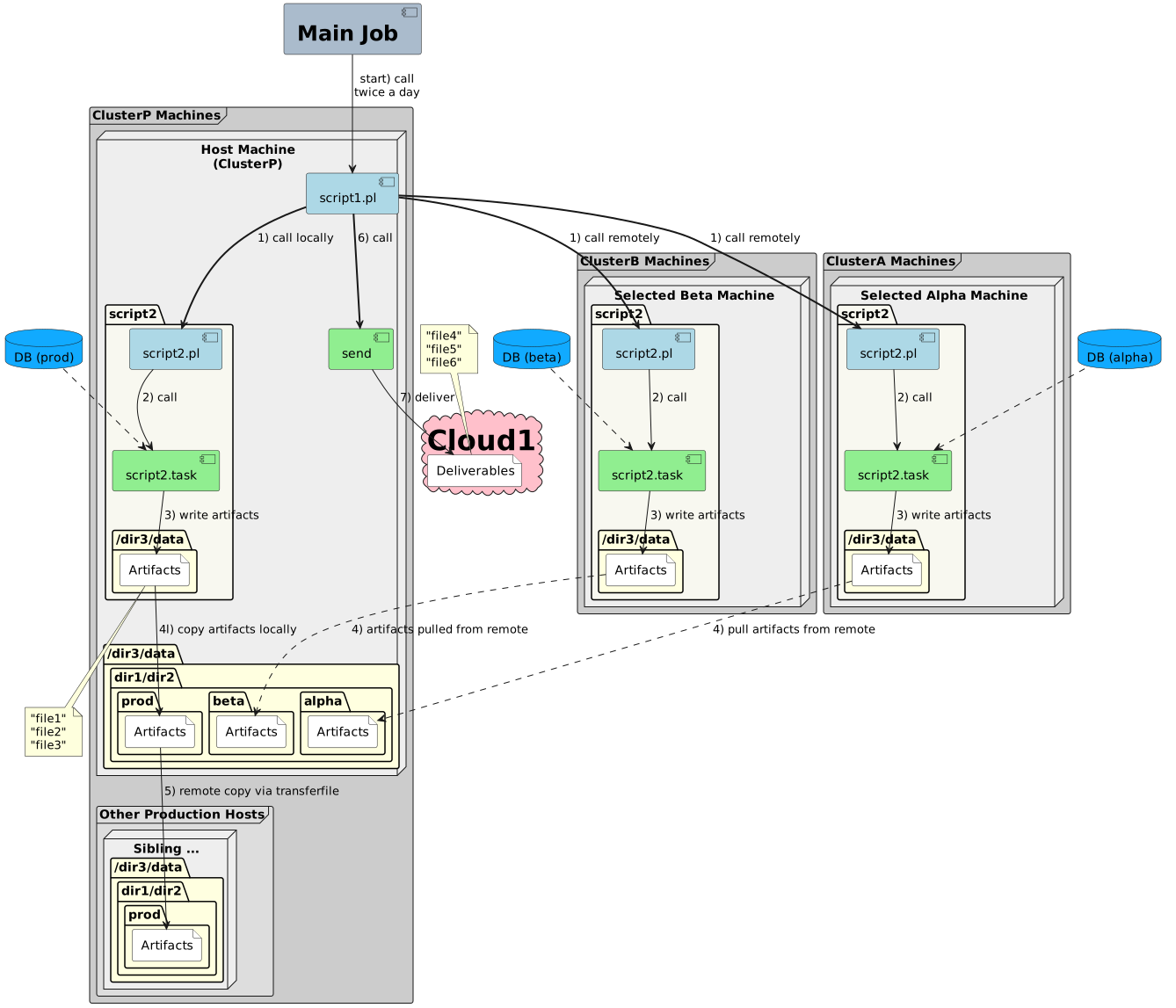
FYI, here is the correct output with the last plantuml version (V1.2024.4):
With GraphViz:
With Smetana:
If that can help,Regards,Th.
Well, it's nice to know that SOMETHING renders it properly.
The image I posted is how the diagram gets rendered in both GitHub Enterprise Server 3.5.19 and Visual Studio Code 1.88, the latter of which is the most current public version. I don't know which software was used to create the graph initially or which library version might be used under the covers by either of the above software.
I wish there was a way to make GitHub do it right, at least.