I've implemented this as a separate command:
```
time-axis unit "ms"
```
Example:
```
@startuml
scale 100 as 50 pixels
time-axis unit "ns"
robust "Signal" as S
concise "Bus" as B
@0
S is Idle
B is Free
@100
S is Busy
@200
B is Data
@300
S is Idle
@enduml
```
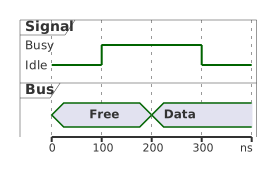
How it behaves:
- The unit is drawn right-aligned under the last tick of the time axis, in the
space the ruler already leaves after the last value, so the diagram doesn't
get wider.
- If it doesn't fit there (a long unit like "clock cycles", or when `scale`
labels that last tick), the time values it would overlap are dropped from
the right until it fits.
- It's a separate command rather than the `scale 1 as 40 pixels : milliseconds`
form suggested in the question, so it also works with the default scale and
with manual ticks.
- It combines with the new `break <from> to <to>` command for skipping long
stretches of the axis.
- Diagrams that don't use it are unchanged.
The code and regression tests are in this pull request:
https://github.com/plantuml/plantuml/pull/2982
If you'd prefer the `scale ... : unit` form, say so and I can look at
supporting it too.