How to have mutliple horizontal levels in WBS?

0 votes
asked Feb 26 in Question / help by anonymous

Hi there,

it seems that currently the WBS chart only renders the second-level horizontally. Is there a way to change that on a global or per level level?

@startwbs
* Business Process Modelling WBS
** Launch the project
*** Complete Stakeholder Research
*** Initial Implementation Plan
** Design phase
*** Model of AsIs Processes Completed
**** Model of AsIs Processes Completed1
**** Model of AsIs Processes Completed2
*** Measure AsIs performance metrics
*** Identify Quick Wins
** Complete innovate phase
@endwbs

By looking at and tweaking this example from the docs I can't figure out how to make the third level (***, e.g., Complete Stakeholder Research, Initial Implementation Plan) horizontally aligned as well.

Is there a way to achieve this?
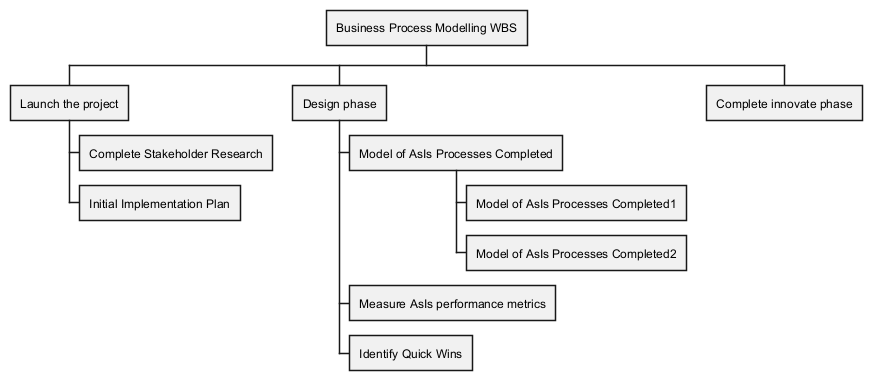
image

1 Answer

+1 vote
answered Feb 27 by The-Lu (85,440 points)

Hello A.,

That seems not yet possible on WBS, but possible on Mindmap, see:

@startmindmap
top to bottom direction
* Business Process Modelling WBS
** Launch the project
*** Complete Stakeholder Research
*** Initial Implementation Plan
** Design phase
*** Model of AsIs Processes Completed
**** Model of AsIs Processes Completed1
**** Model of AsIs Processes Completed2
*** Measure AsIs performance metrics
*** Identify Quick Wins
** Complete innovate phase
@endmindmap

If that can help,
Enjoy,
Regards,
Th.

commented Mar 5 by anonymous

Hi,

thanks for your quick answer. In mindmaps all items are horizontal. I'd need to change between horizontal and vertical based on the level or—ideally—based on the parent.

Could it maybe possible using styles

  node {
    :depth(2) {
      # horizontal "stacking"?
    }

Side question: Is there a description of usable style directives? I didn't find a list/site explaining it.

Regards.

commented Mar 5 by The-Lu (85,440 points)

[Just for the record]

See similar request here:

Regards,
Th.

...







