Timing Diagram participant/player title style color size

0 votes
asked Oct 16 in Question / help by Nick
It doesn't seem that there is a way to change the font style, color or size for a Timing Diagram's concise, robust, and binary player participant's heading/title text on the left.  I do understand that creole can be used, but that would have to be used for every single one.

If a CSS element exists for this, what is it?  If not, please create one.

1 Answer

0 votes
answered Oct 16 by The-Lu (85,440 points)

Hello N.,

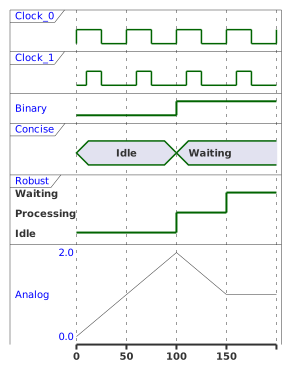
Here is a first global proposal, with style, like:

@startuml
<style>
timingDiagram {
  FontStyle plain
  FontColor blue
  FontSize 10
  concise, robust, timeline {
    FontStyle bold
    FontColor #3
  }
}
</style>

clock   "Clock_0"   as C0 with period 50
clock   "Clock_1"   as C1 with period 50 pulse 15 offset 10
binary  "Binary"  as B
concise "Concise" as C
robust  "Robust"  as R
analog  "Analog"  as A

@0
C is Idle
R is Idle
A is 0

@100
B is high
C is Waiting
R is Processing
A is 2

@150
R is Waiting
A is 1
@enduml
Enjoy,
Regards,
Th.

commented Oct 17 by Nick
I'm going to have to vote down this answer because, as you have said, this amounts to changing the global or root set of styles for every element in the diagram and then reverting that change for other specific items.  This "is a way," but just like the creole option, it's an obtuse workaround.  Thank you though.
...






