sequence-diagram: group or opt boder color and style

0 votes
asked Nov 14, 2019 in Question / help by fengyie007 (120 points)

Can the line color and style of group and opt be modified? like this

Thanks

commented Nov 14, 2019 by albert (3,580 points)
Probably possible, see for the style settings:

java -Djava.awt.headless=true -jar <plantuml.jar>  -language

(and search for Color together with Sequence)

please post also an example (in the question) of the code you have so far / link to the plantuml webserver (http://www.plantuml.com/plantuml) with the example.
commented Jan 22, 2025 by Andreev (100 points)
So there is no way to determine different colors of alt/else (opt and so on) groups by default in the <style> block?

1 Answer

0 votes
answered Jun 19, 2020 by The-Lu (86,940 points)

Hello F.,

Now, with beta-style, we can modify LineColor and group (or opt) style:

<style>
root {
  LineColor black
  Shadowing 0
}
sequenceDiagram {
  participant {
    BackGroundColor white
    LineThickness 1
  }
  group {
    LineThickness 1
    LineColor maroon
    LineStyle 3
    padding 50
    margin 50
  }
  groupHeader {
    FontStyle plain
    BackGroundColor pink
    LineColor maroon
    LineStyle 3
    padding 10
    margin 10
  }
}
</style>

Here is the result:
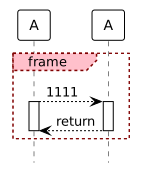

[Click to see on the PlantUML online server]

And to compare, here is the same without any style:
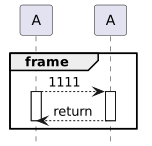

[Click to see...]

If that can help,
Regards,
Th.

commented Jan 7, 2021 by anonymous

Yes, Adding style directly solved the issue.

Fantastic!!

fengyie007: many thanks

commented Oct 29, 2024 by andreas.kagedal (320 points)

I was not able to make this work when using "opt" instead of "group" (same for "alt" and "break"): That is, the below did not work. And, is there a complete documentation for the syntax inside the <style> tag?

<style>
root {
  LineColor black
  Shadowing 0
}
sequenceDiagram {
  participant {
    BackGroundColor white
    LineThickness 1
  }
  opt {
    LineThickness 1
    LineColor maroon
    LineStyle 3
    padding 50
    margin 50
  }
  optHeader {
    FontStyle plain
    BackGroundColor pink
    LineColor maroon
    LineStyle 3
    padding 10
    margin 10
  }
}
</style>
commented Oct 29, 2024 by The-Lu (86,940 points)

Hello A.,

FYI, for "opt", "alt" or "break" that is the same style name: "group" and "groupHeader", as:

<style>
sequenceDiagram {
  group {
    LineThickness 1
    LineColor maroon
    LineStyle 3
  }
  groupHeader {
    FontStyle plain
    BackGroundColor pink
    LineColor maroon
  }
}
</style>

a -> b
opt
a <- b
end

break
a <- b
end

<style>
sequenceDiagram {
  group {
    LineThickness 1
    LineColor blue
    LineStyle 1
  }
  groupHeader {
    FontStyle plain
    BackGroundColor palegreen
    LineColor blue
    LineStyle 2
  }
}
</style>
alt
a -> b
end

Enjoy,
Regards,
Th.

commented Oct 31, 2024 by andreas.kagedal (320 points)
Thanks. Yes this works, The only drawback is that you need to know what the "default settings" are, so that you can reset your these settings after the alt box you want in a different style. And if you later change the default style, you will have to find all these places and update them with the new style.

It would be better with some type of scope handling so you can make a local change without affecting the global setting.  But I don.t have a good proposal now.
...






